Can I Export Raw Data from CID Instruments to My Own Software?


Scott Trimble

April 9, 2026 at 6:35 pm | Updated April 9, 2026 at 6:35 pm | 4 min read
If you are working with plant physiology tools in the field or lab, the ability to export raw data is not just a convenience, it is essential. The short answer to the question “can I export raw data from CID instruments to my own software?” is yes. More importantly, CID Bio-Science designs its instruments with flexible data export in mind, making it straightforward to integrate measurements into your existing analysis workflows.
Throughout this article, we will look at how raw data export works across CID devices and why this capability matters for researchers who rely on precision and customization.
Why Raw Data Export Matters
Researchers rarely rely on a single software ecosystem. Whether you are running statistical models in R, building pipelines in Python, or using proprietary agronomic platforms, having access to raw data export ensures you are not locked into one interface.
Subscribe to the CID Bio-Science Weekly article series.
By submitting this form, you are consenting to receive marketing emails from: . You can revoke your consent to receive emails at any time by using the SafeUnsubscribe® link, found at the bottom of every email. Emails are serviced by Constant Contact
Here is why it matters:
- Flexibility in analysis using your preferred tools
- Transparency in data processing and validation
- Compatibility with custom workflows and scripts
- Long-term data storage and reproducibility
CID Bio-Science instruments are built with these needs in mind. Instead of restricting users to closed systems, they prioritize open access to collected measurements.
How CID Instruments Handle Data Export
Across the CID Bio-Science product line, the approach is consistent. Instruments store high-resolution measurements locally and allow users to export raw data through common interfaces such as USB or SD cards.
Built-In Storage and Transfer Options
Many CID instruments include onboard data logging with large storage capacity. For example:
- The CI-203 handheld leaf area meter supports virtually unlimited storage using an SD card and allows data download via USB
- The CI-202 portable leaf area meter stores thousands of measurements and transfers them directly to a computer through USB
This means you can collect data continuously in the field without worrying about hitting storage limits, then export everything in one step later.
Standard File Formats
CID instruments typically export data in widely usable formats such as CSV or text-based files. This is critical because:
- CSV files can be opened in Excel, R, Python, MATLAB, and more
- No proprietary decoding is required
- Data pipelines can be automated easily
You are not forced to use a specific vendor software to access your measurements.
Instrument-Specific Data Export Capabilities
Let’s take a closer look at how raw data export works across different CID Bio-Science instruments.
Leaf Area Meters
Both the CI-202 and CI-203 are designed for fast, non-destructive measurements, but their data handling is equally important.
Key capabilities include:
- Storage of thousands of measurements
- Export via USB or SD card
- Multiple parameters recorded per scan such as area, length, width, and shape
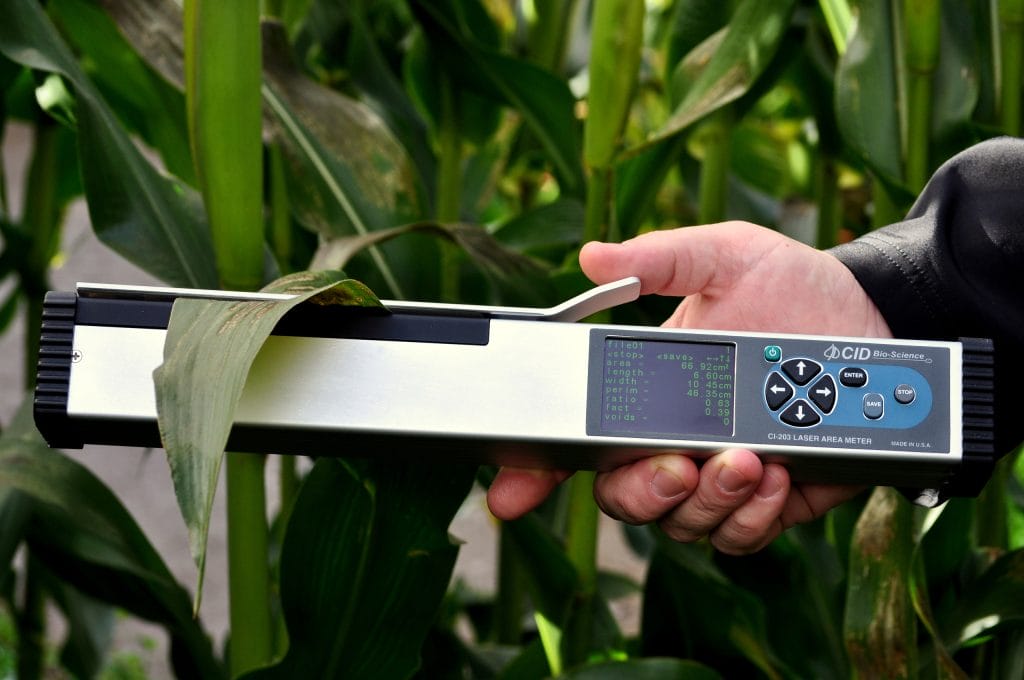
The CI-203 even captures additional metadata like GPS location, which can be exported alongside measurement data for spatial analysis .
This makes it easy to combine leaf morphology data with GIS tools or environmental datasets.
Photosynthesis Systems
The CI-340 handheld photosynthesis system measures complex variables such as gas exchange, transpiration, and stomatal conductance.
For advanced users, raw data export is especially important because:
- Measurements involve multiple environmental variables
- Data may need post-processing or modeling
- Integration with external datasets is common
The CI-340 supports rapid data collection and export, allowing researchers to analyze gas exchange data in their own software environments without delays .
Canopy Imaging
The CI-110 plant canopy imager captures hemispherical images and calculates metrics like Leaf Area Index (LAI) and PAR.
What stands out here is:
- Images and calculated data are saved for further analysis
- Data can be exported and reprocessed if needed
- Users can apply their own thresholding or modeling techniques later
Even though the device provides on-board calculations, it does not lock you into them. You can export raw image data and run your own algorithms if required.
Spectroscopy
The CI-710s SpectraVue leaf spectrometer takes raw data export even further.
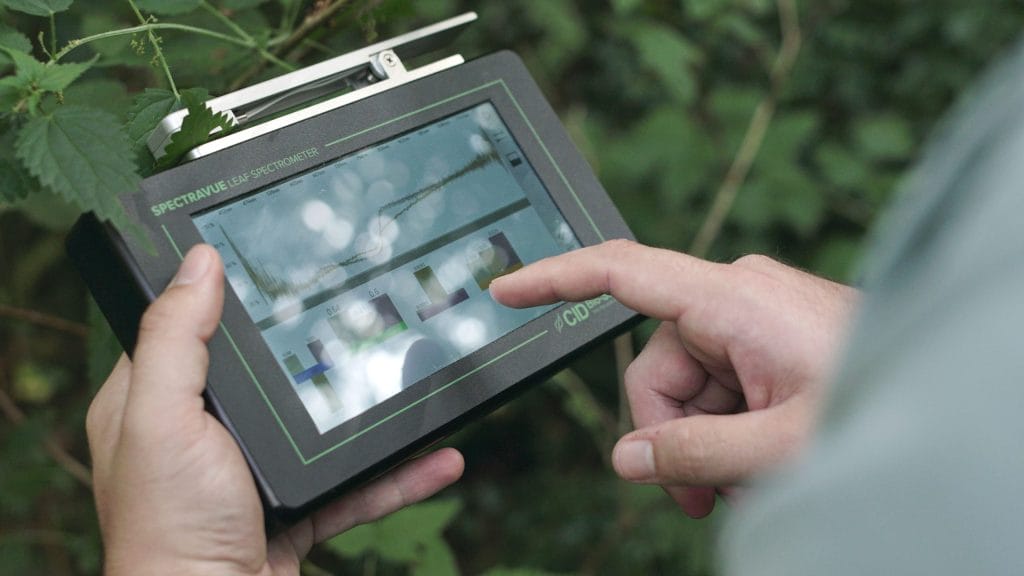
It allows:
- Collection of raw spectral data across visible and NIR ranges
- Use of custom indices and chemometric models
- Export of spectra for advanced modeling such as PLS or ANN
This is particularly valuable for researchers working in plant stress detection or nutrient analysis, where custom models often outperform built-in indices.
Integration with Your Own Software
Once you export raw data from CID instruments, integration is straightforward.
Common Workflows
Researchers typically:
- Export data via USB or SD card
- Import into analysis software such as:
- R or Python for statistical modeling
- Excel for quick analysis
- GIS tools for spatial mapping
- Apply custom scripts or models
Because CID instruments avoid proprietary lock-in, there is no need for complicated conversion steps.
Automation Possibilities
If you are running large experiments, automation becomes important. With CID data:
- CSV files can be automatically ingested into pipelines
- Scripts can batch-process hundreds of samples
- Data can be merged with sensor networks or environmental logs
This level of flexibility is often missing in more closed systems.
Advantages Over Competitors
Many competing instruments limit access to raw data or require proprietary software for export. This creates friction in research workflows.
CID Bio-Science takes a different approach:
- Open data access instead of restricted formats
- Simple transfer methods like USB and SD
- Compatibility with any major analysis platform
- No forced reliance on vendor-specific software
For researchers who need full control over their data, this is a significant advantage.
Best Practices for Working with Exported Data
To get the most out of raw data export, consider the following:
- Organize files immediately after export
- Maintain consistent naming conventions
- Back up data regularly
- Document any transformations or processing steps
These habits ensure your data remains usable and reproducible over time.
When You Might Still Use CID Software
While raw data export is powerful, CID’s built-in software still has its place.
It is useful for:
- Quick field validation
- Real-time visualization
- Initial quality checks
Think of it as a starting point, not a limitation. You can always export raw data for deeper analysis later.
Final Thoughts
If your research depends on flexible workflows and full control over your data, CID Bio-Science instruments are designed with you in mind. From leaf area measurement to spectroscopy and gas exchange, every device supports seamless raw data export so you can work the way you prefer.
Visit CID Bio-Science to explore instruments that fit directly into your existing analysis pipeline and help you move from data collection to insight faster.
Related Products
Most Popular Articles
- Transpiration in Plants: Its Importance and Applications
- Leaf Area – How & Why Measuring Leaf Area…
- How to Analyze Photosynthesis in Plants: Methods and Tools
- Plant Respiration: Its Importance and Applications
- The Forest Canopy: Structure, Roles & Measurement
- Stomatal Conductance: Functions, Measurement, and…
- Forest & Plant Canopy Analysis – Tools…
- Root Respiration: Importance and Applications
- The Importance of Leaf Area Index (LAI) in…
- 50 Best Universities for Plant Science